Development of a Specialized AI Assistant for Game and Software Projects
Not that long ago, AI assistants were some invisible force behind the scenes. No one really cared about them, as they were just doing something quiet. Today, things changed, and AI assistants, as a concept, have become a thing.
Now, they’re showing up inside the products themselves. They are embedded in games, woven into SaaS dashboards, and of course their presence inside mobile apps is undeniable.
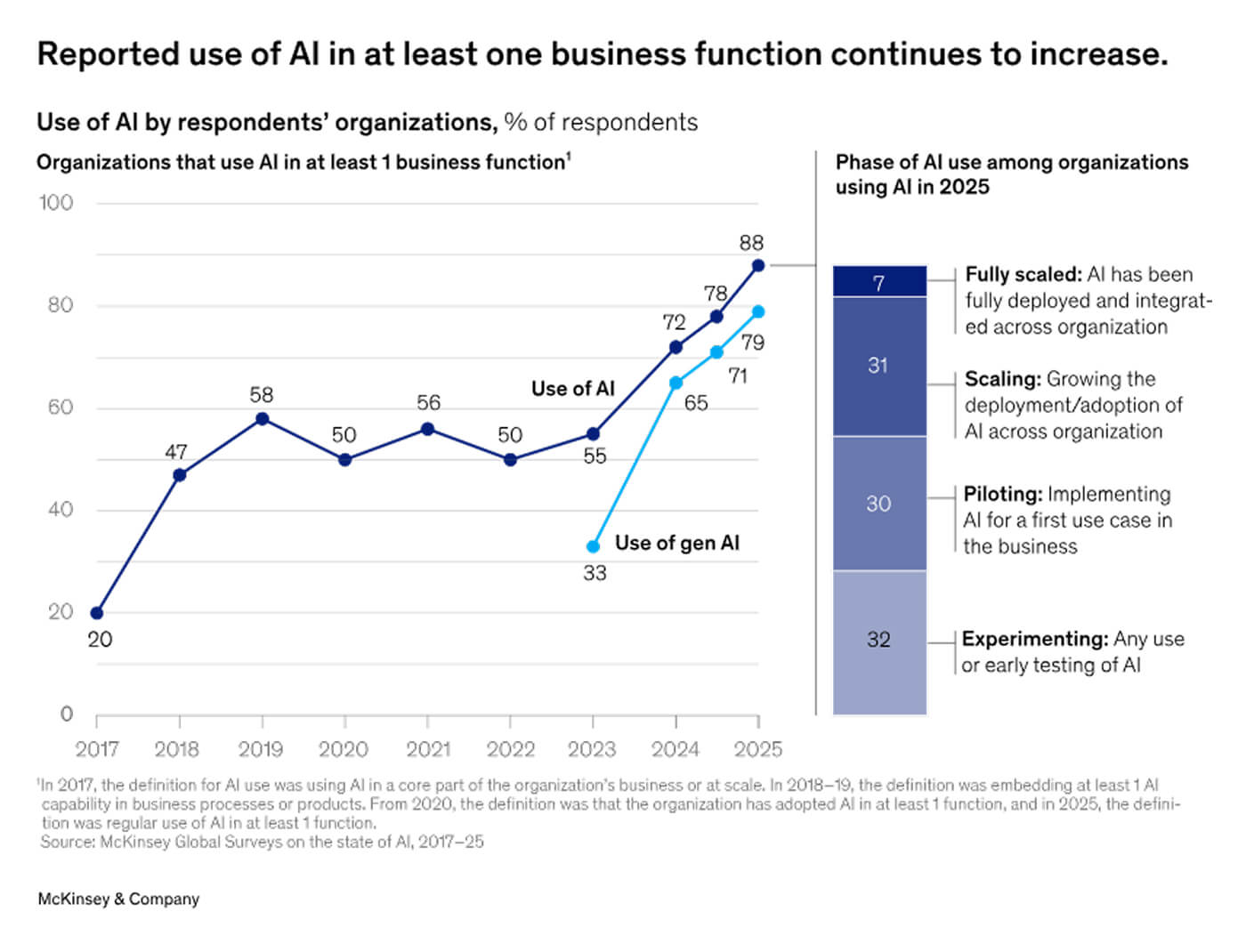
The number of functions AI assistant development can cover is actually big: they greet new users, answer questions mid-session, guide players through complex mechanics, and adapt to individual behavior in real time. The various industry reports only prove that AI is working. For example, according to McKinsey, businesses are using AI in multiple functions, and they are planning to add more.
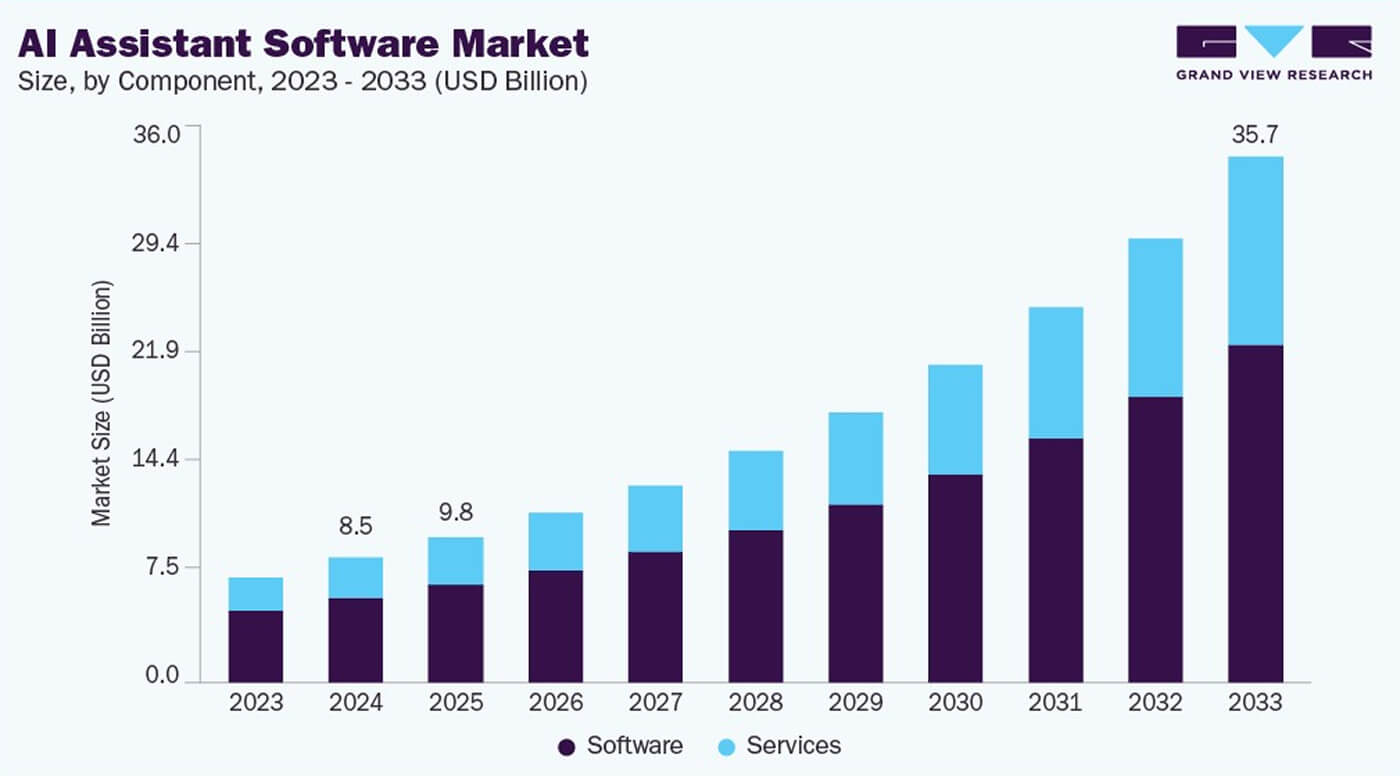
At the same time, response times for customer support or internal requests can just take literally seconds. Now, imagine that could take 10-15 minutes or more! Of course, in the light of these notions, companies are implementing an AI assistant for business operations. They do it internally and inside their products.
But the interesting part is where these assistants are being used.
Companies use AI assistants to automate tasks that previously required human intervention, such as:
- Customer support conversations
- Searching internal knowledge bases and documentation
- Managing workflows and coordinating tasks
- Acting as in-app copilots inside complex software platforms
- Providing interactive help in games or advanced applications
For users, the experience is now much easier in general. They don’t have to deal with long menus or read long help pages, trying to find their specific case and losing interest quickly in the whole product because of that. They can simply ask the assistant.
And AI assistants help users understand systems with ease. For example, they can guide someone through onboarding, explain features, and even automate parts of their work.
When companies create AI assistant features for their products, they usually aim to improve several key things at once: user engagement, onboarding speed, and personalization. If that’s done with quality, the assistant doesn’t even seem to be an extra tool. It is more like a natural part of the software.
Of course, building something like this requires more than just connecting a chatbot API. Teams need to carefully design AI assistant interactions, understand how users behave inside the product, and decide where automation actually helps. Because sometimes, when you automate on a whim, it can get in the way of functions. That’s why many companies choose to build AI assistant solutions by using help from specialized developers.
Interesting fact We focus on creating custom AI assistant systems for digital products. With almost two decades of experience, we know especially well how to add a new technology to games and interactive software.
With these expertise companies can integrate intelligent assistants and improve the user experience while without these options they would probably just add another feature.
What is an AI Assistant for Business?
An AI assistant for business is an intelligent system embedded directly into a product that helps users navigate, complete tasks, and get more value from it. It operates as a native, in-product feature.
Mostly, when someone says AI assistant, they might mean Siri or ChatGPT. These are all technically AI assistants. Technically. But they’re wildly different things, and that difference matters a lot when you’re building one for a specific product or business context.
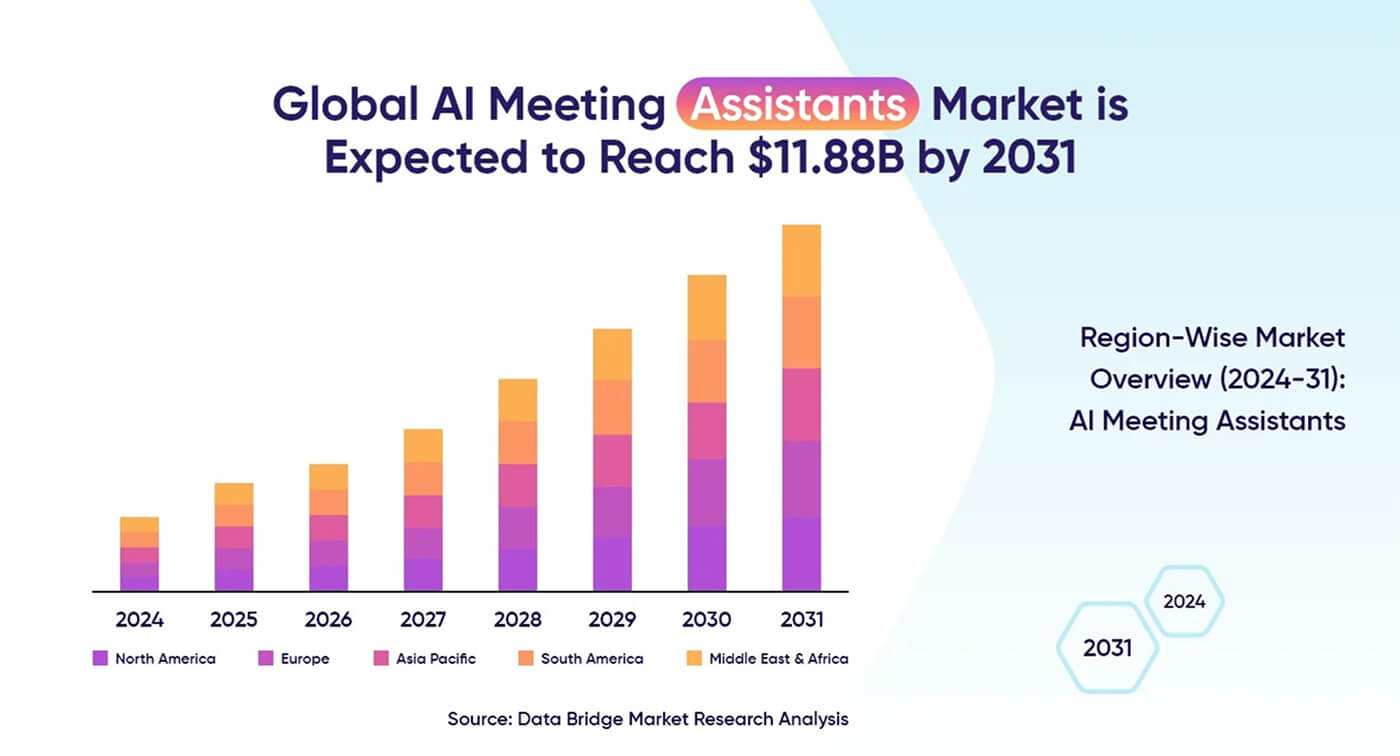
One area of AI assistance deployment is meetings. AI can plan them, summarize calls, and even provide transcription in real-time.
For example, if someone is using a complex SaaS platform, the assistant might explain features and help configure settings. But what about a game? Well, in that case, it would guide players through tutorials, explain mechanics, or provide contextual help when someone seems to get stuck. However, not all AI systems work the same way. The real difference comes down to how they’re built and what they’re designed to do.
This is why many companies are investing in AI assistant development. It’s not as much the matter of automation, as the pursuit of improving how users experience their products. And then there’s a typical difference: between generic AI tools and specialized ones. It might be on the surface, but more often, there are a lot of interesting distinctions.
Let’s see what are the differences between them.
Generic AI tools are the systems most people know very well and use today. These are general-purpose chatbots designed to answer a wide range of questions. They usually operate as standalone tools and have very limited integration with business software or internal company systems. In other words, literally anyone can use them in everyday life.
They are, without doubt, useful. But they’re not deeply connected to follow the product or organization ways of working.
Specialized AI assistant is built for a specific company or product. Because it is trained on company data and integrated with internal systems. Which means it is native to the whole business ecosystem, it literally has been created in that environment. It is also designed to perform very specific tasks.
When companies build custom AI assistant systems like this, the assistant can interact with real workflows, databases, and services. That means it can do much more than just answer questions.
Why Businesses are Building Custom AI Assistants
Apart from being a huge trend that everyone is trying to follow, why do businesses want to adopt AI technology, and create custom AI tools?
First off, there are strategic reasons for that. When businesses have a chance of personalizing the tools they are using so that they become inseparable from the company’s ecosystem, it is naturally much better than using outside solutions.
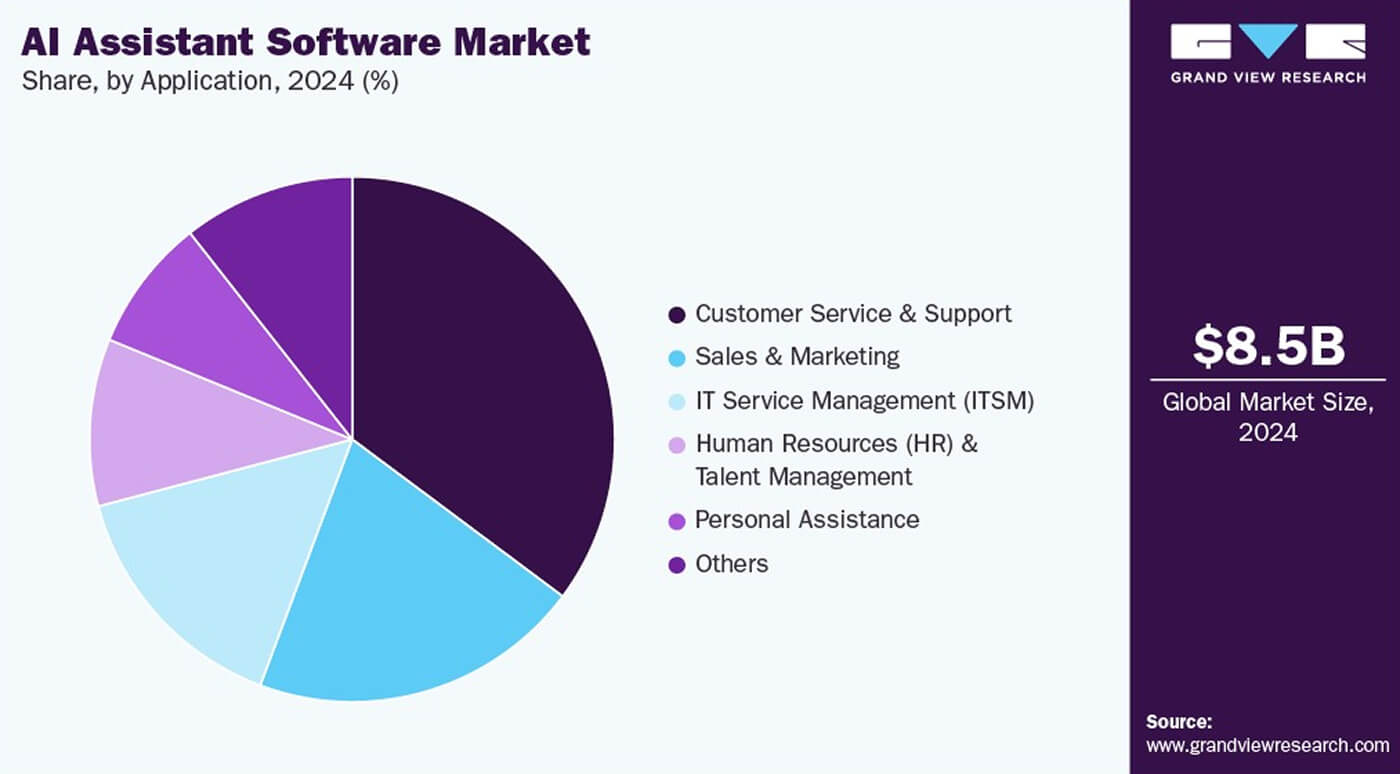
Plus, AI assistants come with one truly exceptional ability: they make possible automation to highly specific workflows and data structures. And you can always tailor the assistant themselves to work the way you need them to.
But let’s take a look at the precise advantages:
- Operational Automation. The number of things that require automation even in small companies can be overwhelming. So, AI powered assistant developments can take care of repetitive tasks such as support responses or data lookup. Moreover, they can handle anything else you need to delegate.
- Efficiency and Productivity Gains. Manual work is one of the biggest slow-downs in productivity. If you simply reduce the amount of manual work, you’ll see a crazy level up in efficiency. Well, it doesn’t take long to realize that scheduling or queries can be done well by AI agents. Which, in turn, allows you to improve creative output.
- Improved User Onboarding. AI assistants can guide new users through complex features. Thus, the learning curve is easier to reduce. Plus, if your product is complex, you can create a virtual assistant that will provide step-by-step walkthroughs for users.
- 24/7 Availability. Obviously, being present 24/7 for human assistants is possible, and that’s what different companies managed to provide. However, you can just use an AI powered assistant to handle it, and even the limited versions will do it well. The biggest advantage is that AI assistants can operate continuously without human touch.
- Data-Driven Decision Making. When it comes to big amounts of data, a few things matter – interpretation and speed. AI analyzes company data very quickly, often it just a matter of and provides insights. You can build an AI assistant or use the existing ones to help your team make decisions based on well-read data.
- Personalized Experiences. Nothing matters more than personalization these days. The more generic experiences you provide, the worse it is for your audience. So, how, in this case, can AI assistant development help? There are countless possibilities to adapt responses based on player behavior or user preferences with an AI powered assistant.
- Scalability. Handles growing business demands without additional hires. Assistants can support thousands of interactions simultaneously.
Creating Custom AI Assistant for Your Business Needs
When a new trend appears, many companies just jump straight on it. Well, it’s not always exactly a good idea. The thing is, before implementing AI assistance, you need to understand what business goals you need it for.
Yes, good AI assistant development starts with a business problem. In fact, according to the Index report, 62% of AI value comes from core business processes. These are many areas where an AI assistant for business makes sense. If you recognize a struggle your team or even the whole company has, you can implement it in the right way.
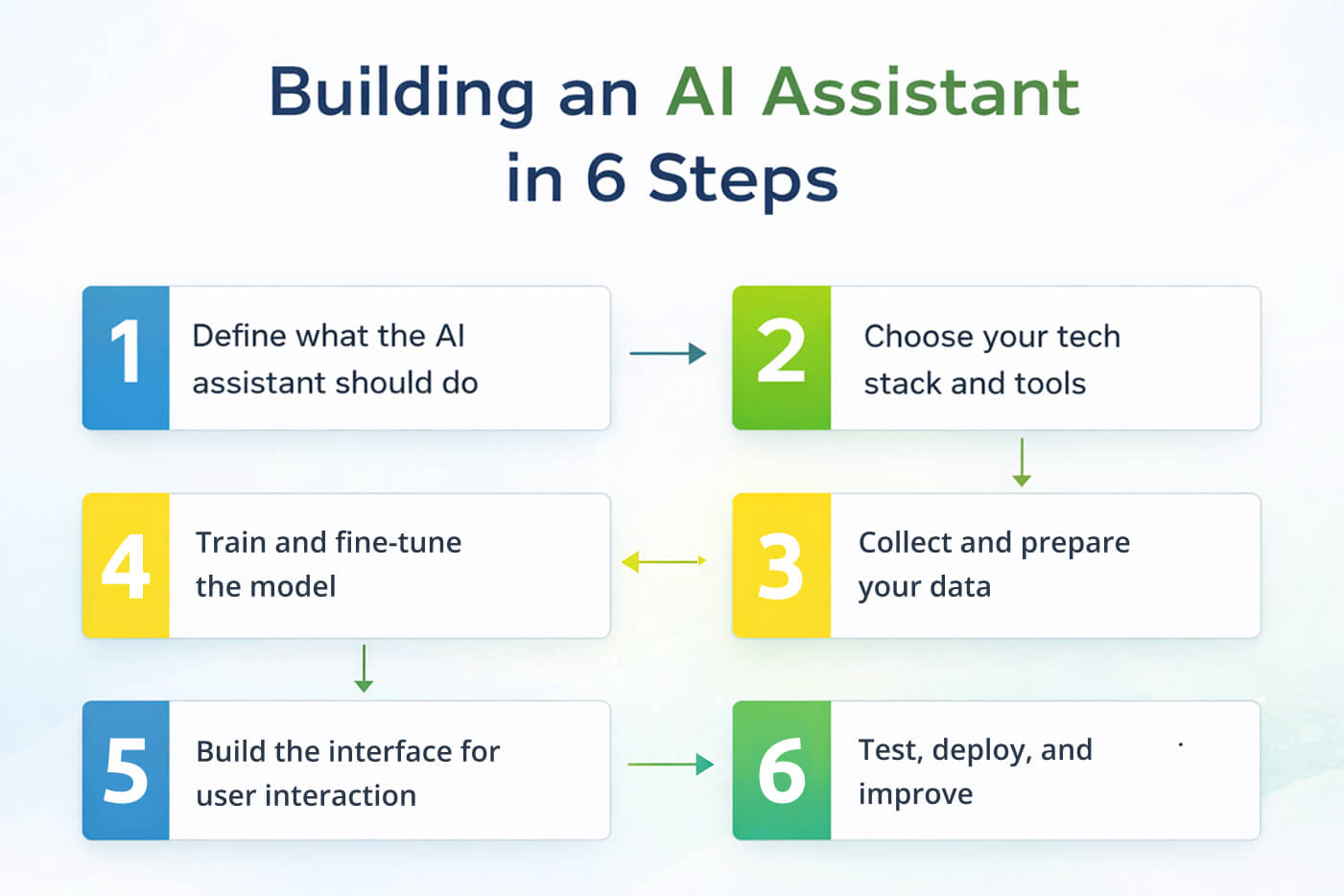
So step one in the full lifecycle of AI assistant development is to map your workflows and find the issues.
Where do users hesitate? Where do they get confused? Where does your team lose time? These questions can show you good starting points.
The next step is defining what the assistant needs to handle.
This is where a lot of teams either overcomplicate things or aim too big. What you need to do at this point is simply to focus on important features of your AI assistant development. For example:
- Should the assistant handle customer questions?
- Should it guide users inside the product?
- Should it automate internal tasks?
When you create virtual assistant functionality, you have to answer these questions. A focused AI business assistant that does a few things really well is better than a generic one, but seemingly with a thousand features that don’t work properly.
At this stage, teams also figure out what data is available and what systems the assistant needs access to. In AI, if you have no data, you will have no intelligence. To put it even more precisely, if you don’t have reliable and relevant data, your assistant will be bad.
Now comes the practical part.
Pro Tip: Every idea is worth building. Some sound great in theory but don’t deliver real value. So before you create AI assistant systems, you need to answer: do we have the data required? You also need to know if the assistant integrates with our existing systems. Another thing is to learn how much time or cost it will actually save.
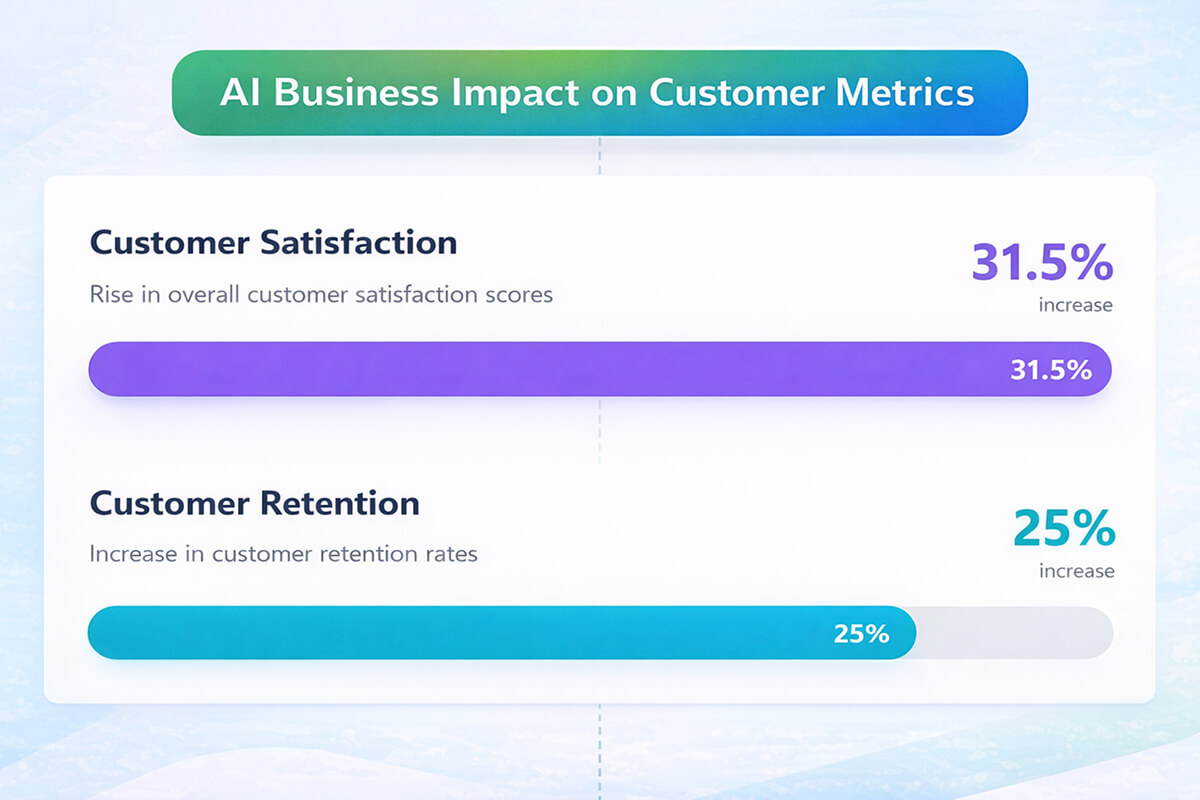
So now, you have a question of ROI. A well-implemented assistant can reduce support costs, and increase retention. But those benefits should be obvious to you, you should know about them immediately.
What’s next, then? Now we get into the main part: experience. Or rather, one of the main pre-parts.
You don’t have to simply design AI assistant responses, because that’s not enough. What you have to design is how it fits into the product. For example, it has to appear at the right moment. That means, you must already know what kind of moment is that for your users.
What does it say (and not say) at that moment?
Then, define the logic: does it guide or wait to be asked? In other words, decide if it is proactive (maybe that fits the spirit of your product) or reactive.
Pro Tip: Just like poor customer support, bad assistant interrupts. A good one is helpful at exactly the right moment. For example, inside a SaaS platform, the assistant might offer help during onboarding. In a game, it could step in ONLY when a player gets stuck, but won’t ruin the gaming experience in other situations.
It shouldn’t be another annoying popup people just learn to skip. On the contrary, it has to be a helpful part of a product. Once everything is clear, it’s time to actually create the system. Or, in more practical terms, create virtual assistant functionality.
Once everything is clear, it’s time to actually create the system.
A custom assistant for business is not one thing, despite what people might think about it. It’s a stack of several layers working together.
- Problem understanding. Before anything else, you need to define the core problem. So, just ask yourself: why it exists, how it manifests, and what solving it actually looks like? This will have a great impact on every decision that follows. It will shape what data to collect, what kind of AI model fits, and what success means.
- Data preparation. Without relevant data, you can’t expect much. So make sure everything is clear: documentation, workflows, product logic etc. Because this is what the assistant learns from.
- AI infrastructure. This is the “brain” of the models that understand requests and generate responses. So you have to put a lot into that, because the quality of what you will produce depends on that, too.
- Backend systems. This is what makes the assistant useful. It connects to databases, tools, CRMs, or game systems, so it can actually do things you need an AI business assistant to do.
- User interfaces. UI is one of the most important parts of user satisfaction and the desire to continue interacting with your product or app. So, it’s important that you make chat, prompts, in-app suggestions, or even voice accessible and easy to use. When companies build AI assistant systems properly, these layers are never chaotic – you will see them connected and work well together.
- Continuous improvement. Here’s the thing, though: your first version will not be perfect. That’s absolutely normal. Users will ask weird questions, and they’ll use the assistant in ways you would never expect. Some answers will be rather off. Strong AI assistant development is strong not because you’ve built one good version, and it’s working for ages. You are just improving and studying what you didn’t know you had to include in the previous version.
How does Fgfactory develop AI Assistants?
We don’t treat AI assistants as standalone features, but rather as part of the product experience. When working on a custom AI assistant, we usually start with understanding how users interact with the product, especially in games and interactive software.
For example, we look at where: players or users get stuck, or guidance improves engagement, or automation enhances the experience.
From there, we design and build AI assistant systems that are native to the product. And when we say “native”, we mean that they are driving business goals, too:
- Better response accuracy. We the assistants have to deliver precise and context-aware answers. There’s no need to build something generic.
- Build a well-structured and wide knowledge base, otherwise, the assistant will miss the depth that allows it to respond fully.
- Improve user experience and satisfaction. That’s a must have point, in our view. Faster, more relevant responses should be natural within the product.
- Avoid AI bias and hallucinations. If the assistant is grounded in verified information, it won’t invent anything.
- Keep business data secured. All the important things, including proprietary logic, workflows, and content stay protected.
- Keep user data private. Privacy is paramount, so we follow its standards from the ground up.
Data Preparation and Agent Training
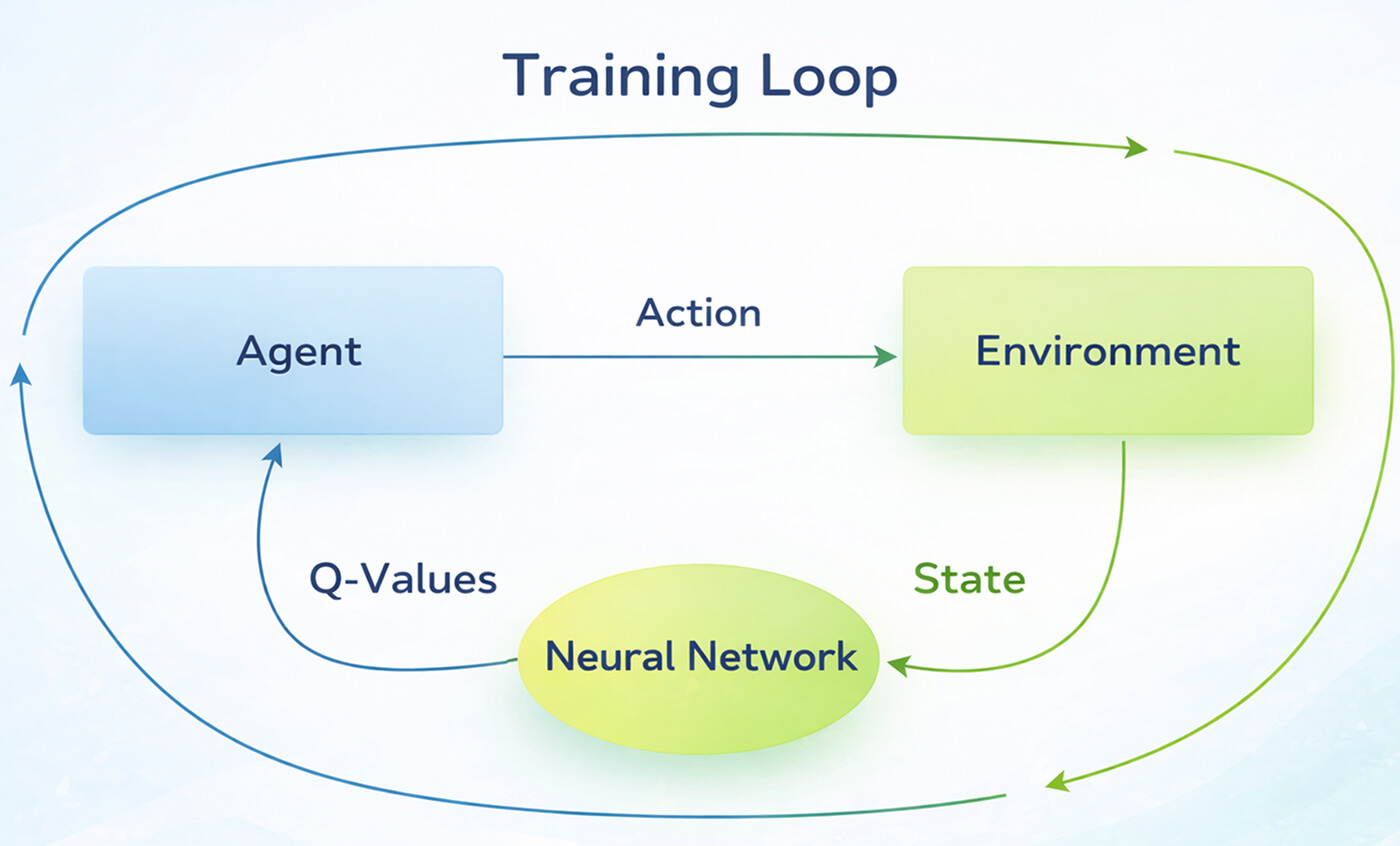
If there’s one stage that can make or break your assistant, it’s this one.
You can have a great UI, and very good infrastructure, but if your data is messy or your assistant doesn’t understand your business, it will fall apart fast. So at this point, focus on data preparation and training, though it might be the most time-consuming part.
Data Collection
Data collection is about making sure the assistant actually understands your world. So, first things first, you need to gather everything the assistant should know. For a typical AI assistant for business, that includes:
- Internal documentation
- Knowledge Bases and FAQs
- CRM Records and Customer Interactions
- Product Manuals and Technical Guides
- Support Tickets and Past Conversations
- Company Workflows and Internal Processes
Data Cleaning and Structuring
On the previous step, you had to add anything your team uses to answer questions. But before that, you need to work with your data. How? Here are a few things to consider:
- Remove duplicates and outdated information
- Standardize formats (so everything is consistent)
- Organize content into clear categories
- Break large documents into smaller parts that might be easier to use
Why does this matter?
Because your AI business assistant can only be as good as the data it uses. If the source is confusing or inconsistent, the answers won’t be different. If you have well-prepared data, now you have to prepare the format your custom assistant for business can actually get.
Knowledge Embeddings and Indexing
Here, your business knowledge gets converted into numerical representations (embeddings), which allow the assistant to “understand” relationships between pieces of information. Then, everything is indexed, so the assistant can quickly retrieve the most relevant data when a user asks something. Quite simple, if you think about it.
On the next step, you have to make sure the AI assistant for business speaks your language.
Agent Training and Fine-Tuning
Training (or fine-tuning) is where you teach the assistant how your business actually works. This includes:
- Company-specific terminology
- Internal logic and workflows
- Product-specific knowledge
- Tone and communication style
When you properly design AI assistant training, the system stops sounding generic. It starts giving answers that actually make sense in your context.
For example, it might explain a feature exactly the way your support team would, while without this training it would just give some generic answer.
Development of the AI Layer
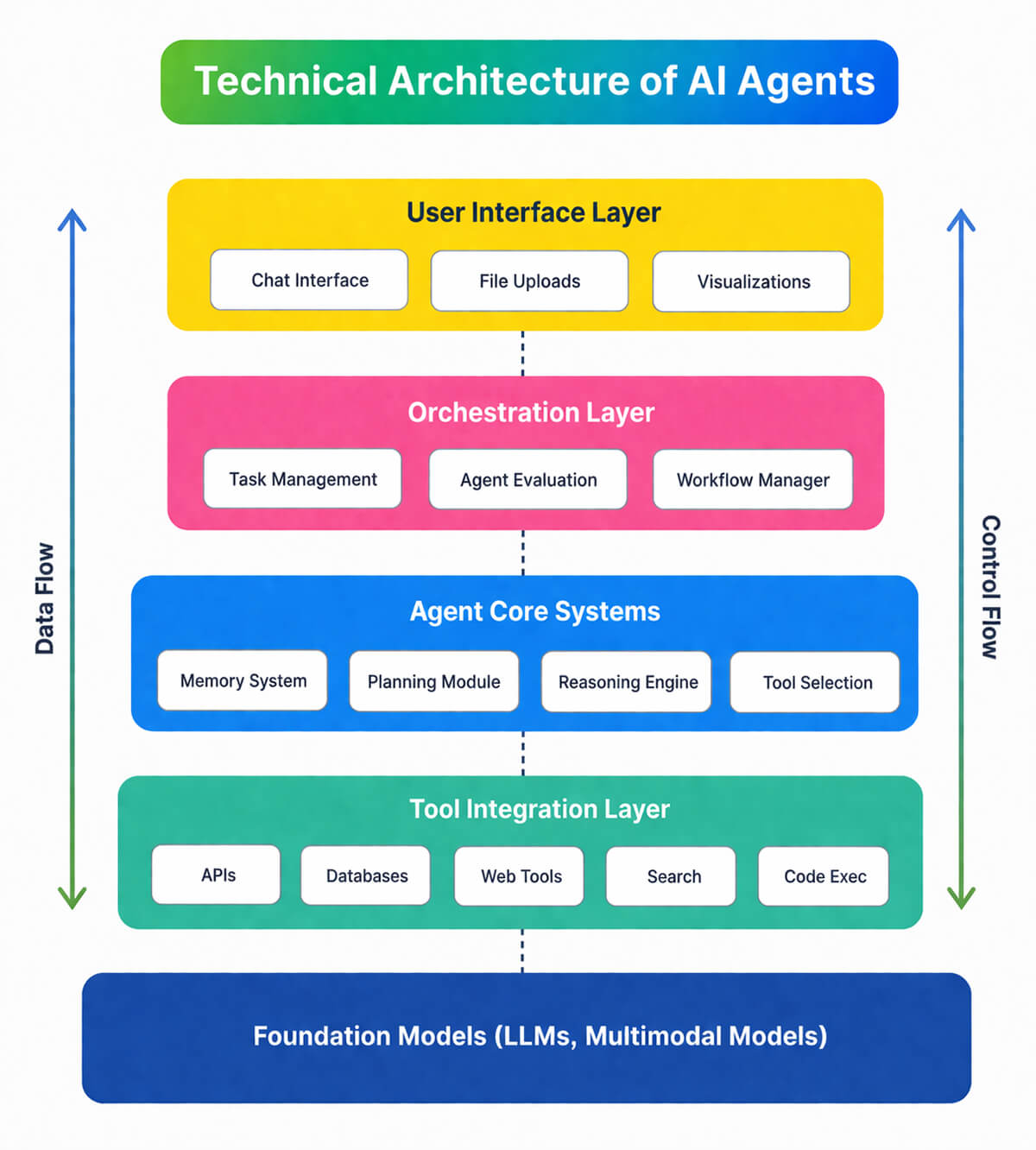
Once your data is ready and your assistant knows what it’s talking about, you need the infrastructure to actually run it. This is the technical backbone.
Infrastructure Setup
To create AI assistant systems that work at a high level, teams usually rely on cloud infrastructure. Common setups include:
- Cloud platforms like AWS, Azure, or GCP
- Containerization tools like Docker and Kubernetes
- Serverless AI APIs for flexible scaling
The goal here is to make the assistant fast, stable, and able to handle real user demand. Importantly, without any breaking.
Another question is what kind of model you should choose?
Model Selection
For conversational experiences, large language models are usually the go-to. But for specific tasks (analytics or automation) you definitely need smaller, but way more specialized models.
When selecting a model, teams usually try to add these three things:
- Latency (how fast it responds)
- Cost (how much each request costs to process)
- Scalability (how well it handles growth)
Here are a few models you can choose for certain tasks your AI assistant will do:
- For code generation the best option is GitHub Copilot, integrated into IDEs like VS Code.
- For conversational tasks, look for Grok 3.
- If your assistant will have to make a lot of images, use DALL·E 3.
- DeepL AI for translation.
- Perplexity AI for research in and summaries.
A powerful model is great, but it might come with big cons you wouldn’t want to deal with. It can be too slow or too expensive to run.
Cost Estimation
AI systems come with ongoing costs, and they can eat your budget even more. It all depends on how you manage them. However, AI system costs are driven primarily by what your AI actually does. In other words, the tasks it performs, and how often. To budget accurately, you need to think in terms of tasks.
Let’s see how it works.
The core unit of cost is the token. Roughly, that’s 750 words per 1,000 tokens. Every request your AI processes consumes input tokens (the prompt, context, and history you send) and output tokens (the model’s response). Output tokens are way more expensive than input tokens (3–8 × the rate), because generating responses is computationally heavier than reading them.
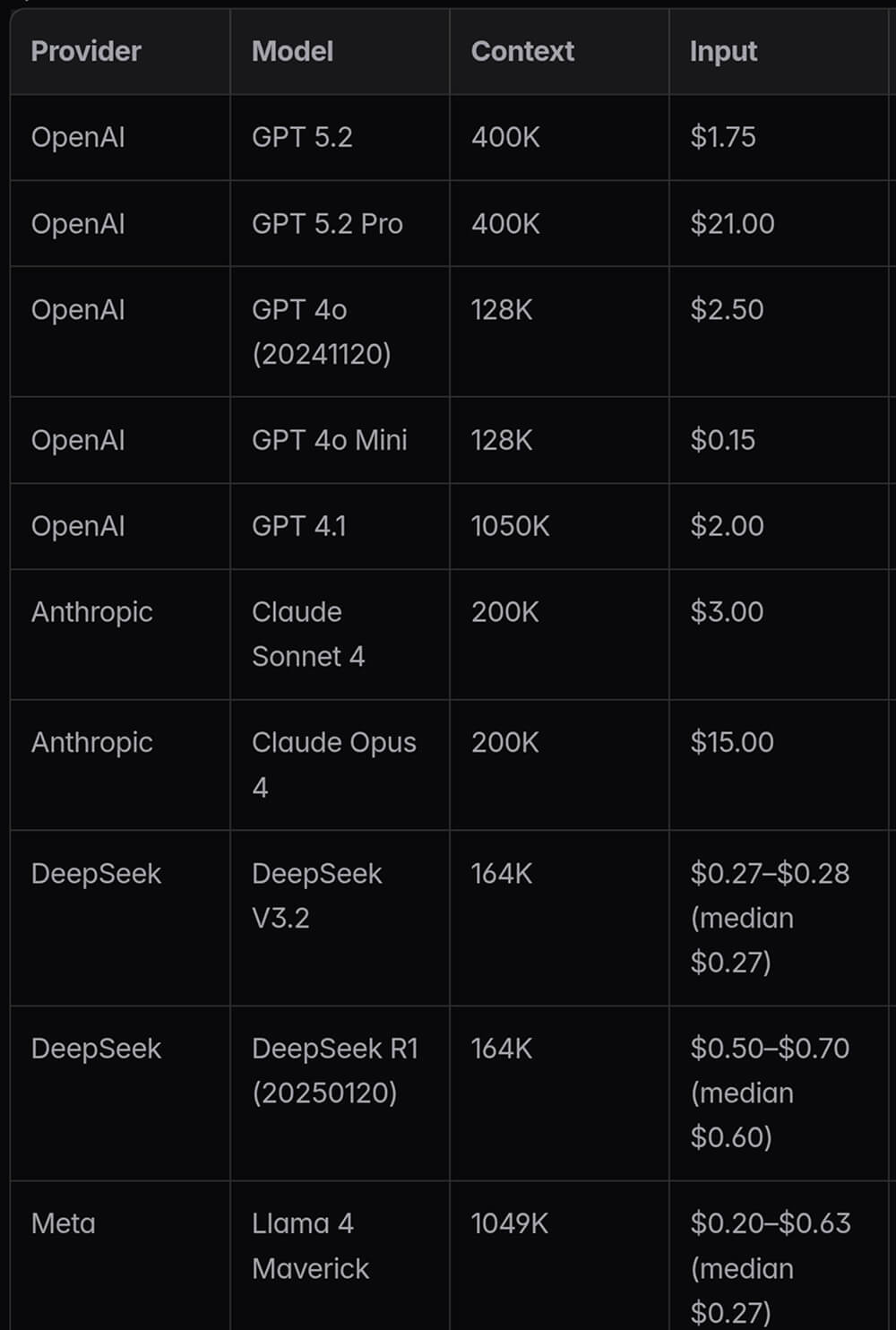
This asymmetry matters a lot depending on your use case: a summarization tool burns mostly output tokens, while a search-and-retrieve assistant burns input tokens. The best approach would be to match your model to your task. Not every task needs a premium model. Claude Haiku 4.5, GPT-5.4 Nano, and Gemini Flash are strong value choices for high-volume tasks.
Meanwhile, Claude Opus 4.6 and GPT-5.4 are better reserved for complex reasoning where quality impacts outcomes. The price difference between tiers is big: for 70–80% of production workloads, mid-tier models perform identically to premium models. So always test cheaper options before committing.
Don’t forget there are other, more technical things. One of the main factors is inference cost, or each request processed by the model. Then comes data storage, model hosting and infrastructure.
That’s why cost estimation is important early on. You need to understand how usage will scale and what it will cost per user or per action. Make sure you choose the right model hosting that corresponds to your AI assistant development level.
Security Configuration
Finally, let’s talk about one important consideration. Maybe the most important one. Enterprise assistants always deal with sensitive data, which makes security a top priority. A properly built AI business assistant should include:
- Role-based access control (who can see what)
- Data encryption (both in transit and at rest)
- Secure API gateways
- Options for private or on-premise model deployment
When companies create virtual assistant systems without strong security, they risk data leaks, compliance issues, and loss of trust.
Backend Development for Interaction with the AI Agent
So, in order to do things, your AI powered assistant has to connect to your business system. Otherwise, it just answers questions and doesn’t provide real impact. It’s the part that allows the assistant to access real data and interact with all the necessary tools. Here’s what it consists of:
API Architecture
First comes API architecture. It allows the assistant to talk to everything else your business relies on: CRM systems, databases, document storage, internal tools and services. Without these connections, your AI assistant for business is basically …guessing. With them, it can pull real data, and give accurate answers, not to mention that it can actually take action.
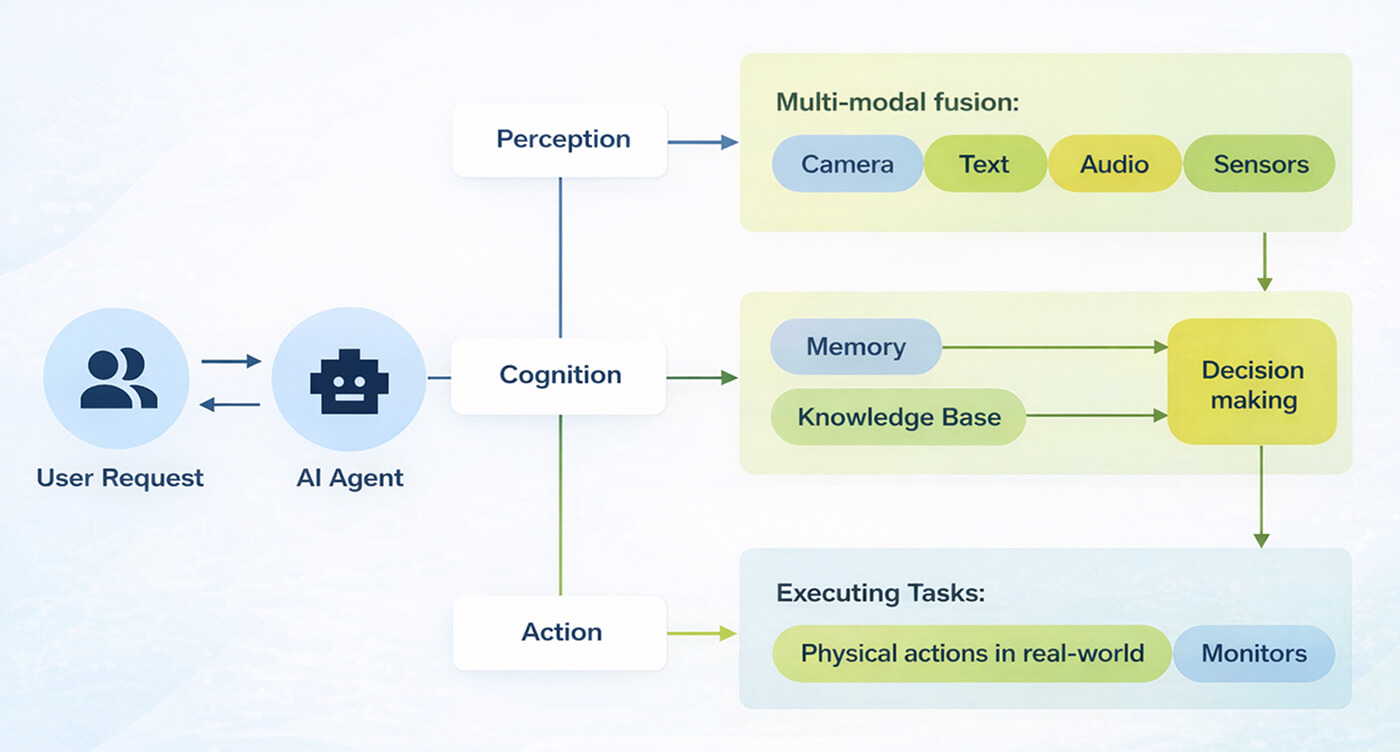
For example, instead of saying “you can reset your password here” the assistant could trigger the reset process directly. That’s a completely different level of usefulness, no matter how you look at it.
Workflow Automation
The next part is workflow automation. This is where things get interesting. A well-built custom AI assistant goes way beyond basic responses that, frankly, any AI system can do. Depending on how you build AI assistant capabilities, it can:
- Create support tickets automatically
- Update customer records in the CRM
- Send notifications to users or teams
- Trigger internal workflows
- Execute multistep processes behind the scenes
So instead of telling a user what to do, the assistant just… does it.
But in order to keep it on a good level, you have to make sure your custom assistant for business remembers the context. Because one of the fastest ways to ruin an AI experience is to make it confused or forget everything.
Context Management
Users don’t want to repeat themselves every two messages. They expect the assistant to remember what they asked and where they are in the process.
If the request your AI powered assistant system received is forgotten, a user will have to begin again. If multiple requests are not stored, then the whole context simply crushes and user experience is ruined.
Integration Layer
In practice, it works like a coordinator. It receives the user’s request, starts analyzing the intent, and routes it to the right place. If needed, it combines multiple steps. For example, it can be retrieving data from a system and then using the AI model to create an easy response.
Frontend Integration
If the backend is the engine, the frontend is what users actually see and interact with. And this part matters just as much.
Web chat Іnterfaces. This is the most common format. The assistant appears as a chat widget inside a website, dashboard, or platform. Users can ask questions, get help, or get actions without leaving the page.
In-game characters (NPCs). In games, things get more interesting. Here, you don’t necessarily need a chat box, because the assistant can take the form of a character. That could be the NPC that interacts with players through dialogue. Importantly, the assistant needs to be natural inside the game world, and it should not be like an external tool.
In-app AI copilots. In more complex platforms (SaaS or enterprise tools), assistants can take the role of copilots. They sit inside the interface and guide users step by step by explaining features and suggesting actions. A strong AI assistant for business here is something like an expert sitting next to you while you work.
Chat and voice interfaces. Beyond text, some assistants also support voice interaction. Users can speak commands, ask questions, or navigate systems hands-free. This is especially useful in mobile apps, games, or situations where typing is inconvenient. It’s not always necessary, but in the right context, it’s a big usability boost.
Real Use Cases for AI Assistants in Games and Software
Let’s move away from theory for a second and look at how this actually works in real products. Because when you do everything right, it changes how people use the product.
AI NPC Companions
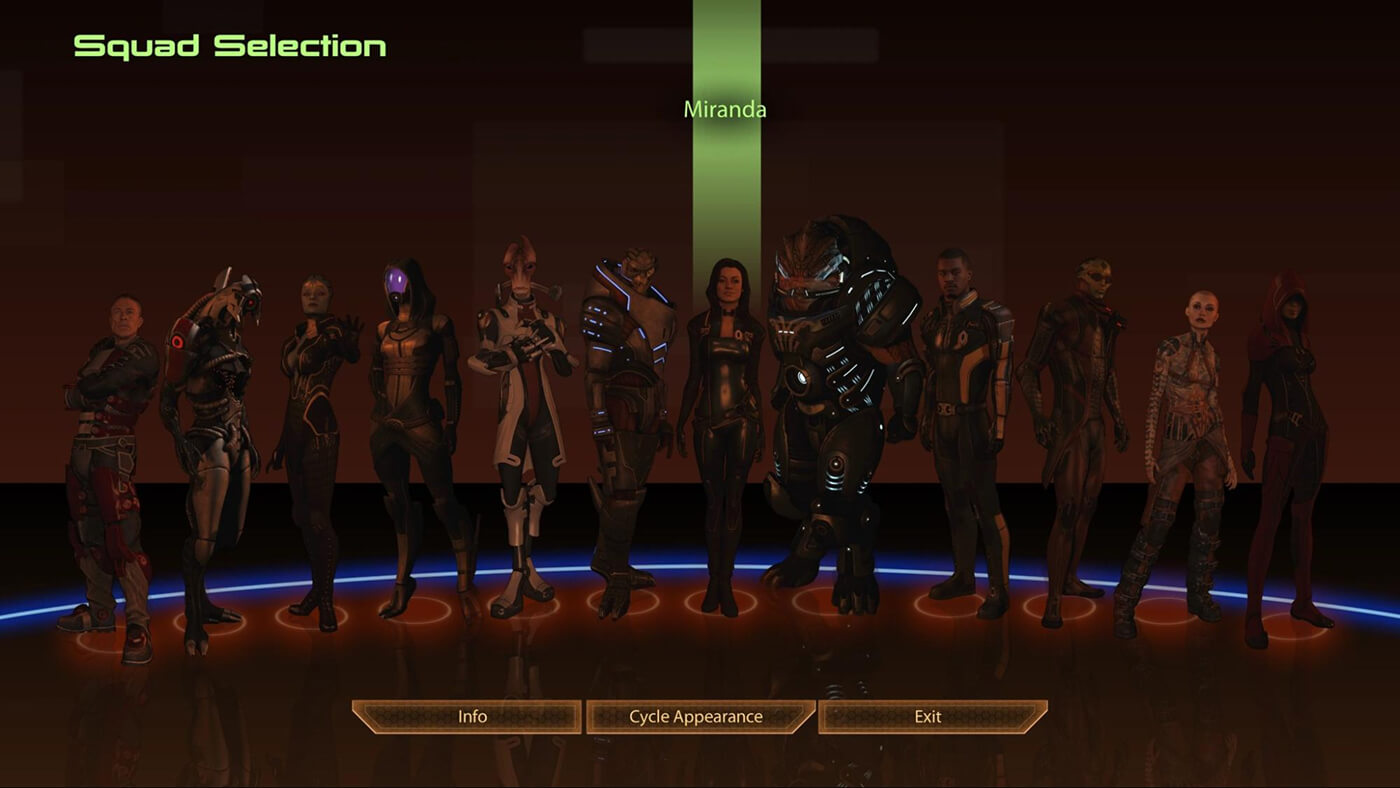
In games, when you create an AI assistant system, one of the most interesting use cases is AI-driven NPCs. Most usually, there are typical dialogue trees. But in this case, players interact with characters that can respond dynamically. These NPCs can:
- Give gameplay tips based on what the player is doing
- Guide users through quests
- React to player decisions in a more natural way
- Provide contextual hints without breaking the normal flow of the game
The big win here is engagement. Players will feel it like a part of the game, or, worst case scenario, more like a real interaction. Which is not bad at all! Many players said that the best type of AI-controlled companions are those that feel natural during the battle and don’t act off.
For example, Mass Effect companions are considered to be incredibly good. They listen to your request, their abilities are helpful, and they even help you during the missions.
Interactive Game Guides
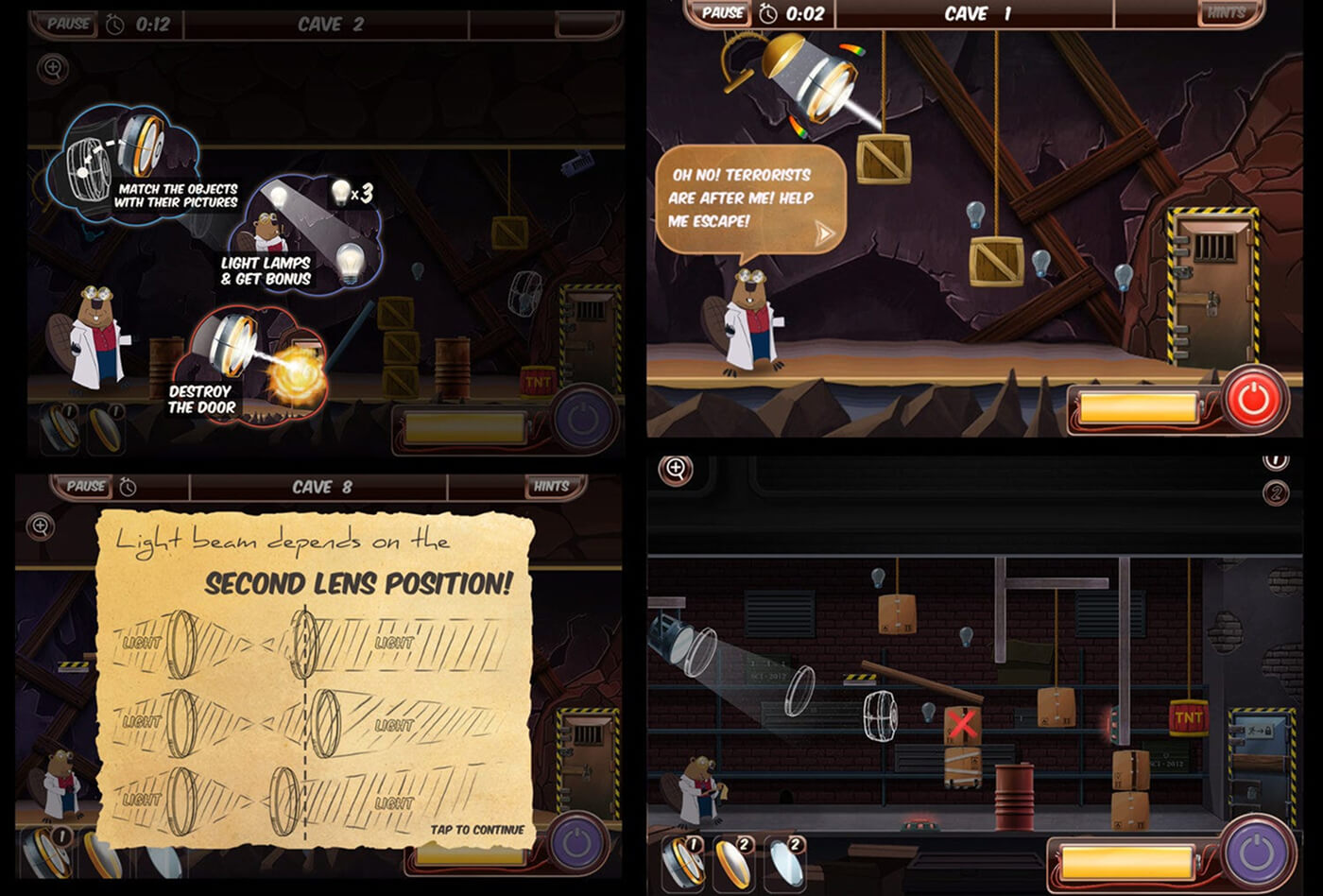
Since games are getting more complex, having tutorials makes sense. But what player would enjoy it? Mostly, long help sections don’t really work.
The answer for this issue in the spirit of our time would be an interactive guide. Instead of forcing players to read or watch something upfront, the system helps them in real time. It can explain mechanics when it makes sense, or answer “what do I do next?” moments.
In an RPG, if a player picks up a crafting item but hasn’t used crafting before, the guide can pop up and say: “You can combine this with X to create a health potion. Want me to show you?” Also, if you are running out of gold in a strategy game, a game guide might just suggest upgrading your mines.
Smart Help Systems
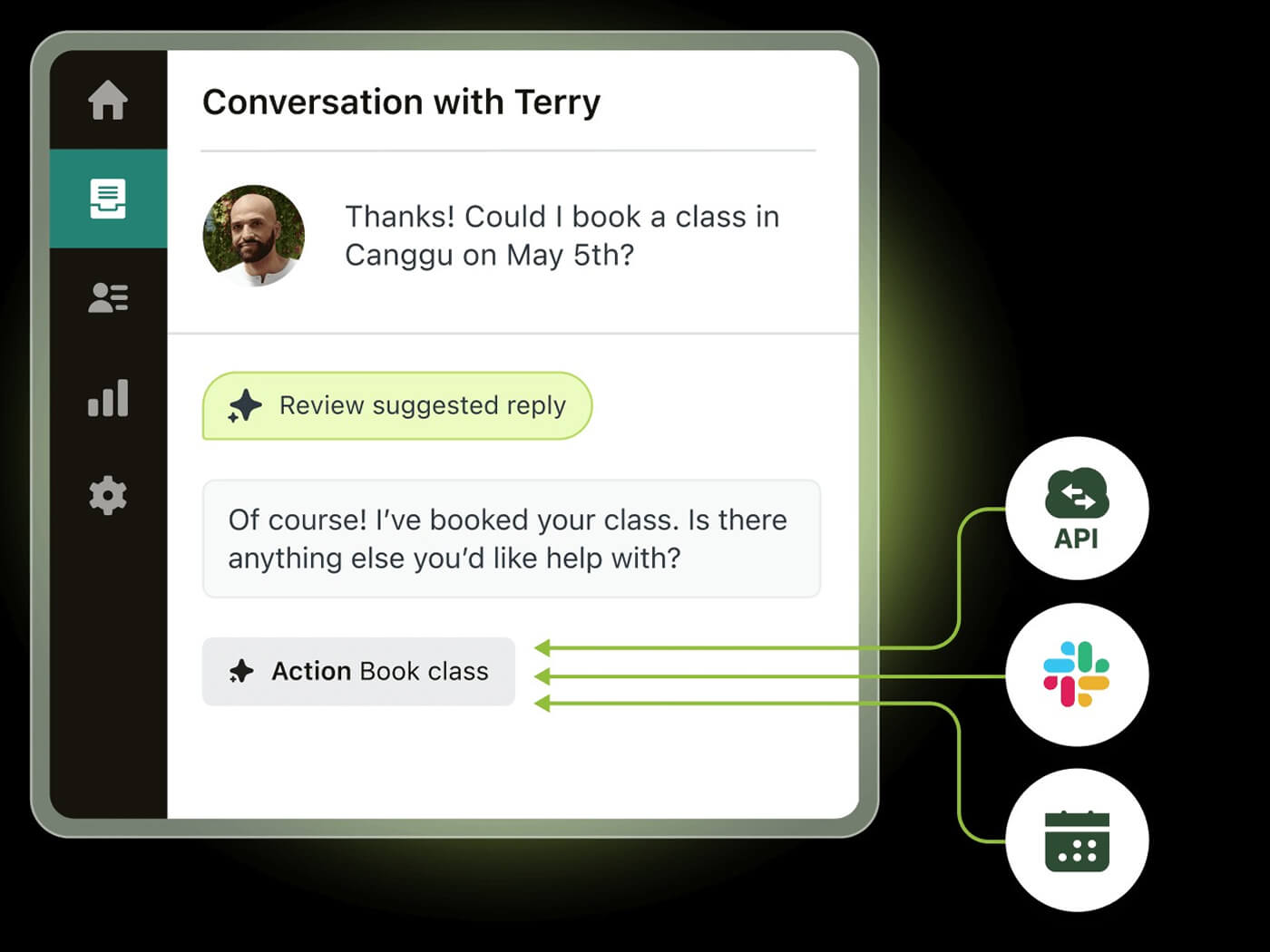
In both games and software, support teams deal with the same questions over and over. Just check the history and you will probably see the same thing.
A well-implemented custom assistant for business can handle a huge chunk of those automatically. For example, you can make it deal with account issues, feature explanations or troubleshooting steps.
Let’s say, if a user asks “How does billing work?“, the custom AI assistant for business, explains pricing tiers based on the user’s plan. Users get instant answers, and support teams can focus on more complex cases.
Internal Knowledge Assistant
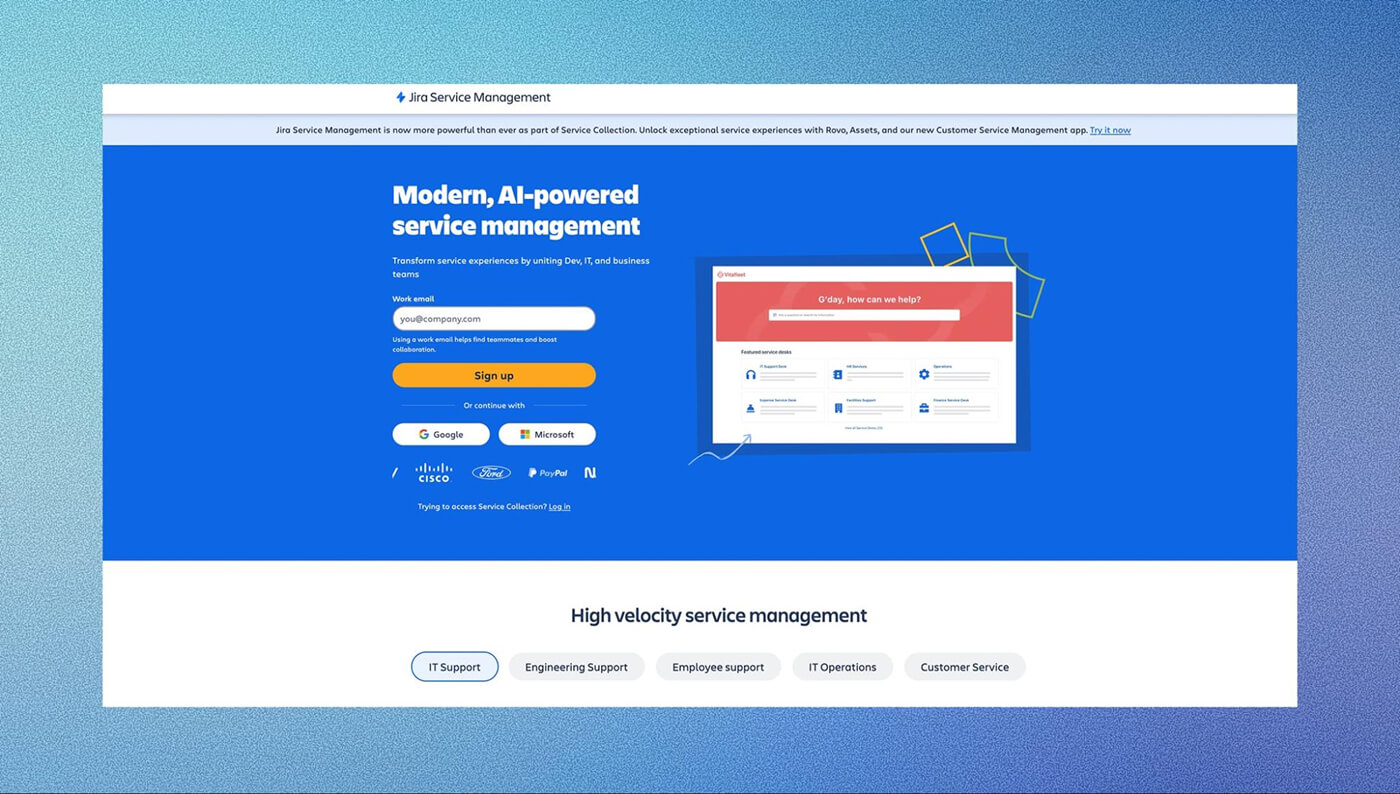
Atlassian Jira Service Management mixes ITSM features with knowledge management
Inside companies, a lot of time is wasted searching for information. No wonder, right? With all the policies, documentation, onboarding materials it might be hard to find what you need. Yes, they’re all there, but not always easy to find.
AI assistant development can change that. So you can quickly get a certain document, or the latest version of a certain guideline. For example, if a sales manager preparing for a call asks for the latest pricing guidelines, a custom assistant for business can get the current version in seconds.
Operations Automation
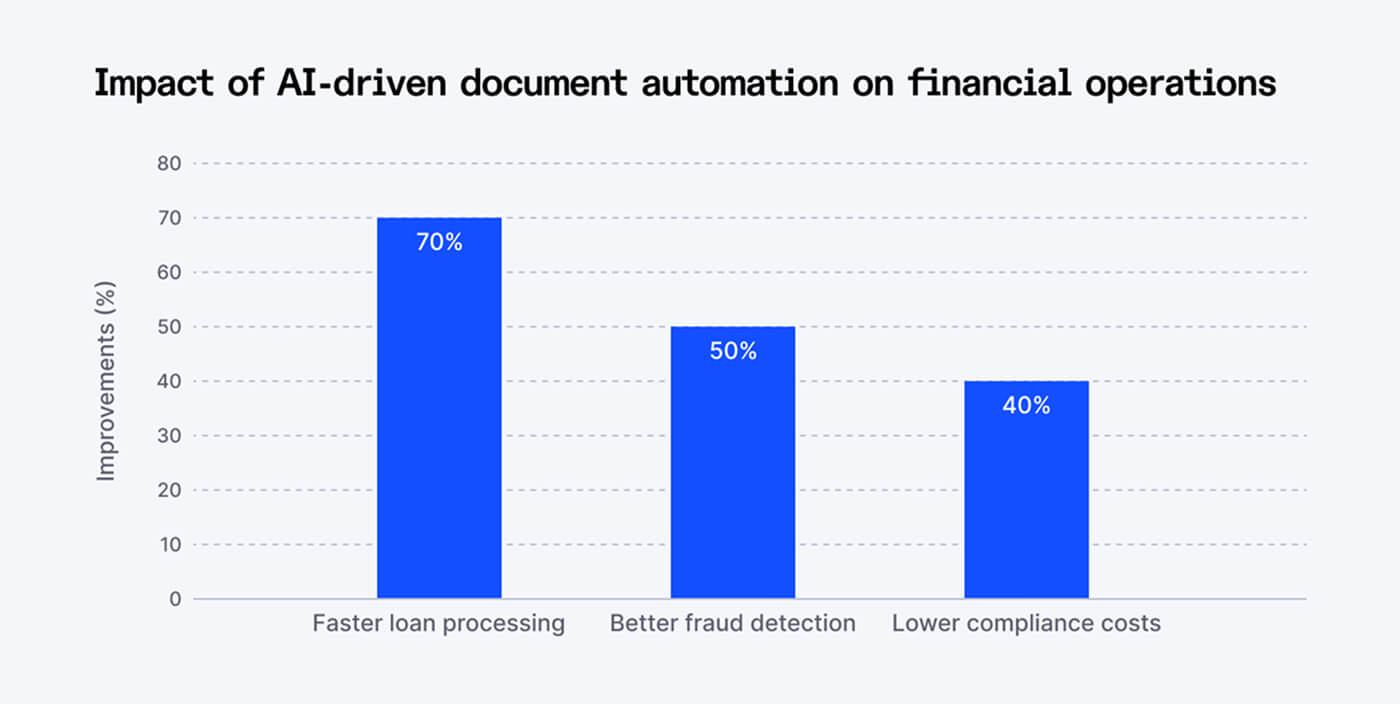
This is also one of the things that originally was associated with AI. Well, now it is doing it really well. Assistants generate reports, schedule meetings or tasks and coordinate workflow. Not to mention such a basic thing like sending reminders and updates.
But in a game studio, it might even: automatically log player-reported bugs, Tag issues based on severity, and notify the right team. Not to mention that you can ask the system to create a ticket in the tracking system, or schedule a meeting with a specific team.
Challenges and Best Practices in AI Assistant Development
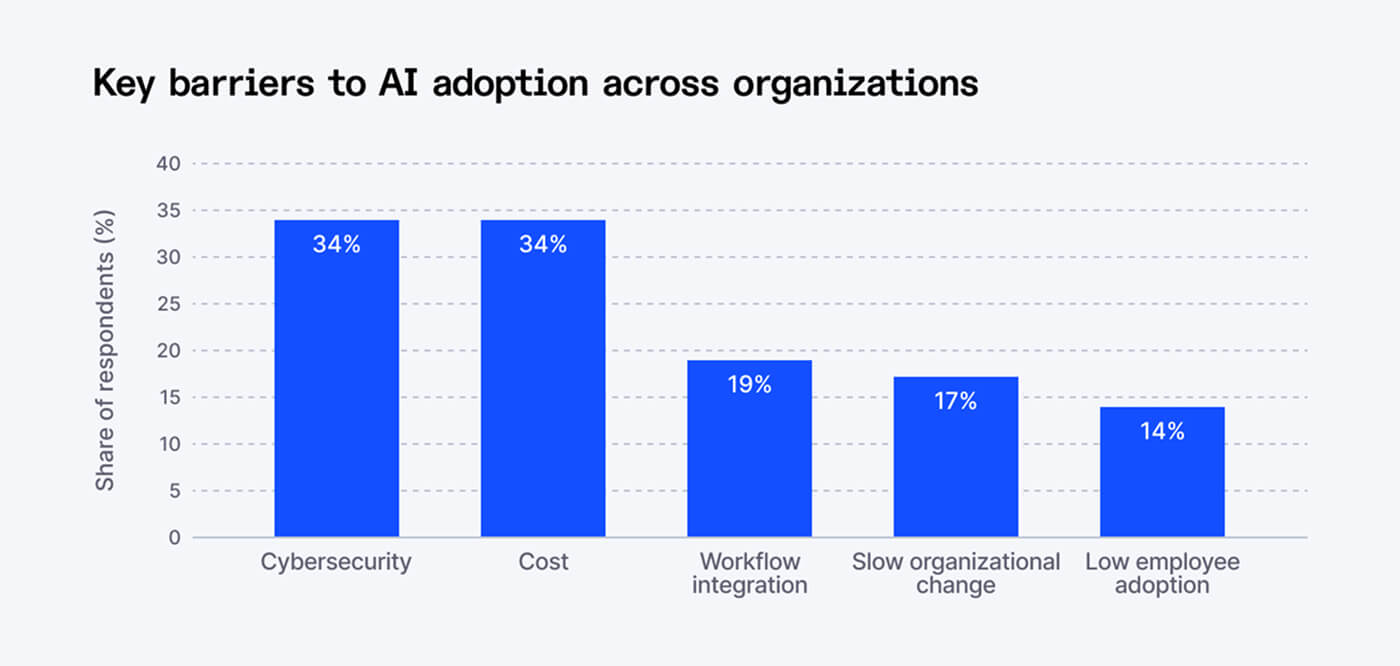
Even though AI assistant development progressed a lot very quickly, in almost an explosive manner, it still has a lot of challenges. And if you know them before you actually start creating your own AI assistant for business successfully.
Data Quality Issues
As you know, the data is in the center of everything when it comes to AI. So if your documentation is outdated, inconsistent, or incomplete, the assistant can’t help but use it anyway. If you want to keep your audience and your users, you need to have it.
Hallucination Risks
When you create AI assistant systems, you should be aware that they don’t “know” things the same way we do. If it doesn’t find an answer, it might generate something that sounds correct… but is not.
A separate but no less important risk is AI bias. This happens when the assistant’s responses are skewed. It can be due to the data it was trained on, or the way questions are framed. And, as we have mentioned before, the gaps in the knowledge base itself always open up a possibility of an inaccurate answer.
In practice, this can mean:
- Giving favour to certain answers over equally valid ones
- Reflecting cultural, linguistic, or demographic assumptions
- Giving different quality responses to different user groups
If you don’t address that, bias can kill trust in your assistant. Users won’t be able to pinpoint why. That’s why bias detection and knowledge base auditing need to be part of the build process.
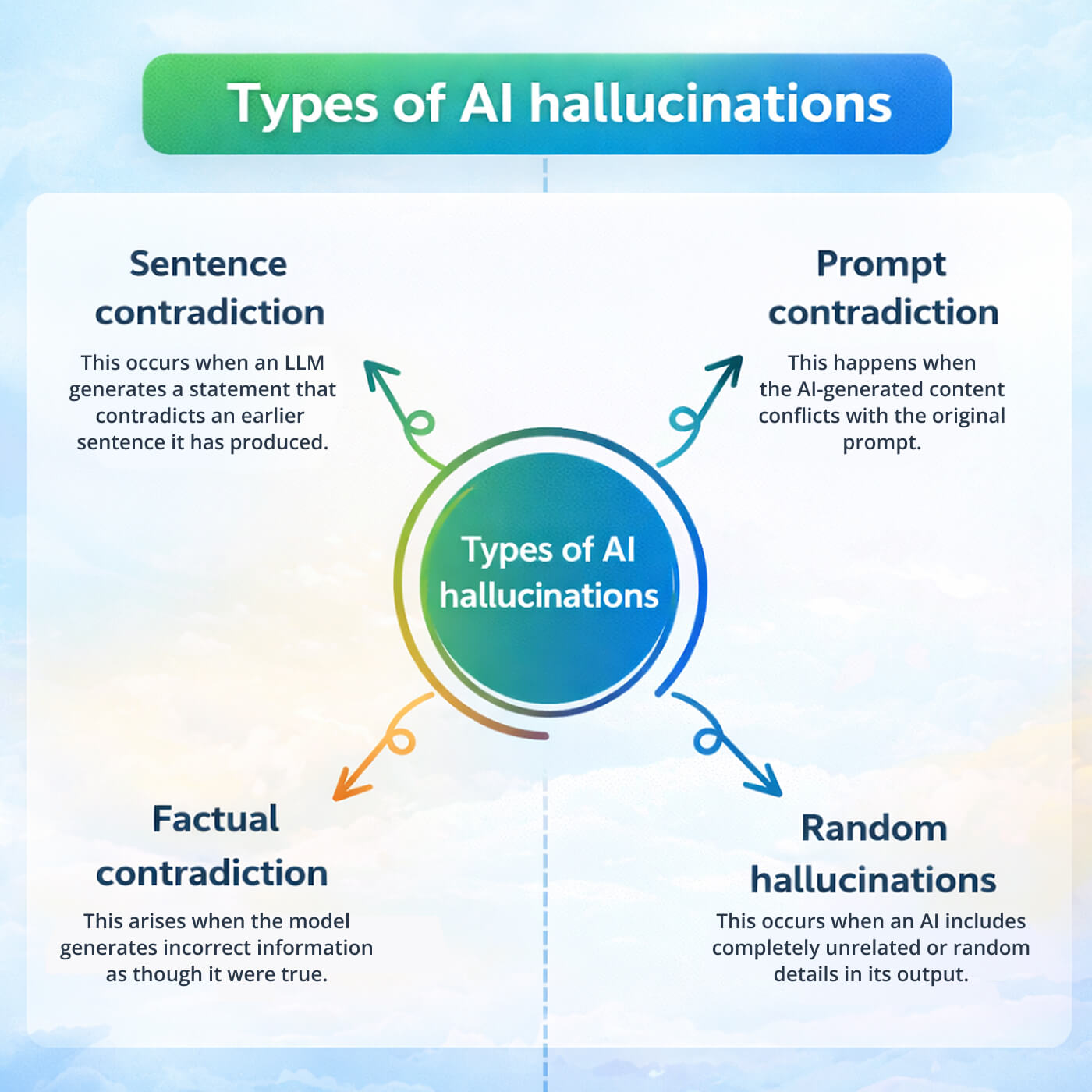
We all have heard about this, or maybe even experienced it. ChatGPT and other models very often made mistakes due to these hallucinations. When you create virtual assistant systems, it might hallucinate, too.
Of course, allowing that when it comes to your business is risky. So, how to prevent it? You need to have strong knowledge sources, and clear boundaries on what the assistant should and shouldn’t answer. That is the must.
Did You Know? Since late 2023, a company called Vectara has been tracking how often chatbots get things wrong, even on simple tasks. Their findings showed that chatbots made up information at least 3% of the time, and in some cases, the error rate went as high as 27%.
Integration Complexity
Connecting the assistant to real systems is often harder than expected. Especially when you create virtual assistant solutions for businesses.
CRMs, databases, internal tools have different structures, permissions, and limitations. And if you don’t have a proper API architecture, things get bad really fast. This is usually one of the most technical parts of the whole process, Moreover, when building a custom assistant for business that needs to work across different systems.
Security and Privacy
If the assistant has access to internal data, security becomes extremely important. Why? Because you are dealing with sensitive stuff like customer information, internal processes, and well, there business data that is sensitive by default.
Pro Tip: Add strict access control, encryption, and secure infrastructure to make sure any important information is not exposed.
Cost Management
AI is not a thing you can pay once and forget. You will have to pay for requests, interactions, etc. In fact, every piece of infrastructure adds up. If usage grows quickly, costs can grow just as fast. Without proper monitoring, it’s easy to overspend.
But the good news is, you can overcome the challenges with best practices. Here’s what strong teams usually do:
- Continuous Monitoring. Track how the assistant performs and try to see the exact moments it fails. Can you find out why that happened? If you can, then it will be easier for you during further AI assistant development to improve everything.
- Human Feedback Loops. Let real people review responses and improve them, because, after all, people are the ones who are going to be interacting with your product.
- Regular Retraining. As your product changes, your assistant should too. Update data, refine behavior, expand capabilities – do everything that you think will improve your custom AI assistant for business.
- Security Audits. This is simply a healthy thing to do. Security is highly important, and it’s always, no matter how you look at it, under threat. The standards are changing every time, so you have to keep an eye on it.
Fgfactory Experience in AI Assistant Development
At this point, it should be pretty clear: building a working AI assistant is a full product effort. And it is not always easy to do that alone.
Fgfactory takes a different approach, making it solid from the beginning. The company focuses on building assistants as part of real digital products. Especially so in games and interactive software, because this is where user experience actually matters.
Many companies offer one piece of the puzzle, but Fgfactory covers the whole process end to end. That includes:
- Custom AI assistant development specifically made to meet to specific product needs
- Data preparation and model training to make sure the assistant understands the business context
- Infrastructure architecture to make sure performance and scalability is there
- Backend and frontend integration, so the assistant works well and without problems inside the product
- Scalable deployment that can handle real users and growing demand
The main idea is to build solutions that can be added to real workflows, and no matter if they are supposed to help players inside a game or guide users through the mazes of software.
How can we work together?
Not every company needs the same level of involvement, so Fgfactory offers a few collaboration models depending on what you’re building.
Full-cycle development
This is the end-to-end approach. The entire project is planned and delivered in milestones that we decide on before we start to work.
Dedicated team
If you need ongoing support, you can work with a team that fully works with your process. We just add the right talent to your product, and they help you achieve your goals sooner. Together, we can create AI assistant systems that work flawlessly.
Co-development
Already have a team? No problem. Fgfactory can work with your developers, adding experience and helping move things faster without replacing your existing setup.
Conclusion
AI agents have unlimited potential, and not using them right now is… just a good way to stay behind. Behind new possibilities and your competitors. Developing an AI assistant for business now is more like a necessity.
If you’re building a game, a SaaS platform, or any kind of interactive software, it’s worth exploring how an assistant could improve the experience. Moreover, if you create virtual assistant systems now, you will start working with the trend earlier, and it will be easier to keep up with new developments in the future.
And if you want to do it properly, not just experiment, working with a team that’s done it before makes a big difference.
Ready to build your AI assistant? Get a free consultation

 Loading...